


What Is an IT Strategy for a Professional Services Firm?
An IT strategy is a documented plan that aligns a firm's technology, cybersecurity, IT support, and investments with its business goals. It establishes long-term priorities, while daily IT support handles immediate technical needs such as password resets, application problems, and email issues.
Developing an IT strategy starts with identifying your firm's business objectives and evaluating how its current systems, security measures, personnel, and technology budget support those goals. From there, leadership can establish priorities, assign responsibilities, and determine implementation timelines.
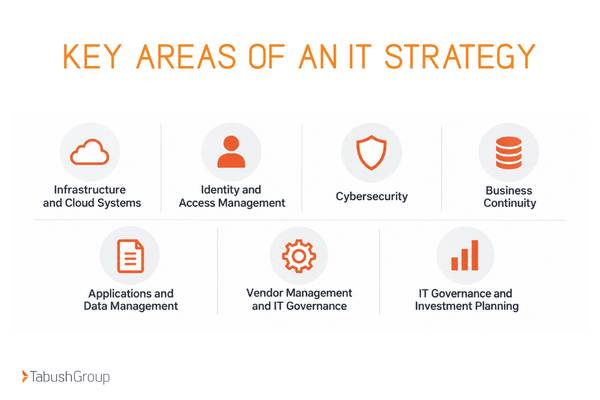
Key Components of an IT Strategic Plan
A comprehensive IT strategy typically addresses seven areas:
- Infrastructure and Cloud: Evaluate servers, networks, devices, cloud platforms, and remote access capabilities.
- Identity and Access Management: Determine who can access applications and information, how permissions are assigned, and when access is removed.
- Security: Review protective controls, monitoring, employee awareness, and incident response procedures.
- Continuity: Establish how critical systems and information will be recovered following an outage, equipment failure, or security incident.
- Applications and Data Management: Assess whether business applications support current workflows and integrate appropriately.
- Vendor Oversight: Clarify responsibilities for maintenance, technical support, security, and third-party providers.
- Governance: Assign decision-makers, establish budgets, and track progress against business priorities.
These components provide the foundation for a longer-term technology plan. An IT strategy roadmap then translates those priorities into specific projects, timelines, milestones, and responsibilities.
Leadership should review the roadmap regularly to evaluate progress, identify opportunities for improvement, and adjust priorities as the firm's needs change.
How IT Strategy Changes by Professional Services Industry
The foundation of your IT strategy is similar across professional services firms, but specialized applications, client workflows, and regulatory requirements change your priorities.
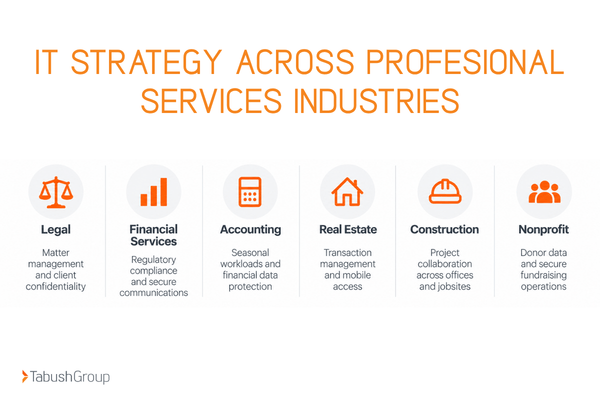
IT Strategy for Law Firms
To keep your law firm running smoothly, you need consistent access to case files, matter management systems, email, billing applications, and other platforms.
Law firms have professional obligations to protect confidential client information and must consider applicable legal, ethical, and regulatory requirements when making technology decisions. Whether your team is at the office, in the courtroom, or visiting a client, you need secure access while maintaining confidentiality controls.
Law firms using Microsoft 365 should also review file-sharing permissions, guest access, and retention settings as part of their IT strategy.
Example:
When preparing for trial, attorneys and staff need reliable access to case documents, secure communication tools, and matter management systems to meet filing deadlines and coordinate with clients.
IT Strategy for Financial Services Firms
Your financial firm has to operate under strict regulatory oversight, adhering to confidentiality and record retention requirements.
Your firm may need to evaluate:
- Access to client records
- Retention settings
- Third-party applications
- Security practices of technology vendors
Financial services firms can use a financial services cybersecurity compliance checklist to organize applicable requirements, assign control owners, and document supporting evidence.
Example:
A financial advisory firm expanding into a second office may need to standardize application access, review client data permissions, and evaluate how employee communications are retained across locations.
IT Strategy for Accounting Firms
Accounting firms experience fluctuating workloads throughout the year, particularly during tax season, payroll processing periods, and financial reporting deadlines.
IT planning should account for application performance, system capacity, cybersecurity, and the timing of technology upgrades to accommodate these periods of increased demand.
To avoid costly mistakes, read our blog, “10 IT Mistakes Costing Accounting Firms in 2026.”
Example:
An accounting firm plans to replace its tax preparation software but discovers that the new platform may not integrate with its existing document management system. An IT strategy can help the firm evaluate compatibility, test workflows, and schedule the transition before employees depend on the new software.
IT Strategy for Real Estate Firms
Your real estate team relies on multiple connected systems to manage listings, communicate with clients, and complete transactions, including:
- Multiple Listing Service (MLS) platforms
- Customer relationship management (CRM) systems
- E-signature applications
- Transaction management software
- Cloud document storage
Real estate agents and brokers frequently work outside the office and need reliable access to transaction documents, email, and e-signature tools.
When planning system upgrades, real estate firms should consider how to modernize IT without disrupting closings, including testing applications and scheduling changes around important transaction deadlines.
Example:
A brokerage is expanding and needs to onboard 15 new agents. Without a standardized IT process, agents may receive inconsistent access to listing platforms, shared files, and transaction tools. An IT strategy can establish onboarding procedures, device requirements, and access controls that support growth.
IT Strategy for Construction Firms
Construction firms coordinate information across offices, jobsites, subcontractors, and project stakeholders.
Your projects rely on:
- Project management platforms
- Estimating software
- Accounting systems
- Scheduling tools
- Shared drawings
Construction firms need reliable connectivity across multiple locations, secure mobile device management, appropriate subcontractor permissions, and access to project information from both jobsites and offices.
For a closer look at common technology issues, read Tabush Group's guide to technology challenges facing construction companies.
Example:
A construction company begins working with several new subcontractors on a large project. Its IT strategy can establish procedures for granting temporary access to project documents, assigning responsibility for approving permissions, and removing access when subcontractors complete their work.
IT Strategy for Nonprofit Organizations
Nonprofit organizations often manage technology with limited internal resources while supporting fundraising, program delivery, volunteer coordination, and grant reporting.
Donor management systems, fundraising platforms, grant records, and shared documents may contain sensitive personal or financial information. Nonprofits should review how employees and volunteers access, store, and share that information.
IT planning should also account for employee and volunteer turnover, including procedures for transferring responsibilities, removing outdated accounts, and maintaining access to essential systems during staffing changes.
Example:
Before a major fundraising campaign, a nonprofit may need to review donor database access, payment processing systems, and backup procedures to reduce the risk of disruptions during an important fundraising period.
IT Priorities by Industry: A Comparison
|
Industry |
Mission-critical applications |
Time-sensitive workflows |
Key security and compliance considerations |
|
Legal |
Matter management, document management, e-discovery |
Court filings, discovery, client deadlines |
Client confidentiality, professional obligations, document access |
|
Financial services |
Financial platforms, CRM, records systems |
Reporting, transactions, regulatory deadlines |
Applicable SEC/FINRA rules, GLBA, record retention |
|
Accounting |
Tax software, accounting platforms, client portals |
Tax season, audits, payroll |
Financial data protection, applicable FTC and IRS requirements |
|
Real estate |
MLS, CRM, e-signature, transaction management |
Listings, offers, closings |
Wire fraud prevention, transaction data, privacy requirements |
|
Construction |
Project management, estimating, accounting |
Bids, schedules, jobsite coordination |
Contractual requirements, subcontractor access, project data |
|
Nonprofit |
Donor CRM, fundraising, accounting, grant platforms |
Campaigns, grant reporting, program delivery |
Donor privacy, payment security, volunteer access |
In-House, Co-Managed, or Managed IT: Choosing a Support Model
The right IT operating model depends on the firm’s internal capacity, technology complexity, security needs, and the responsibilities it wants to retain.
In-House IT
With an in-house model, employees of the firm manage technology operations, user support, maintenance, vendor relationships, and IT planning.
However, a small internal team may struggle to cover specialized areas such as cybersecurity, cloud infrastructure, and disaster recovery while also responding to everyday support requests.
Evaluate whether your internal team has the time, skills, and coverage needed to meet the firm's requirements.
Co-Managed IT Services
Co-managed IT combines your internal IT team with a technology partner. Responsibilities are divided according to your firm's resources and needs.
This model can be useful for growing firms that want to retain internal technology leadership while expanding their technical resources.
Successful co-managed arrangements require clear documentation of responsibilities, escalation procedures, and decision-making authority.
Managed IT Services
With fully managed IT, a technology partner takes responsibility for an agreed scope of ongoing IT operations, which may include technical support, maintenance, monitoring, and infrastructure management.
This approach is commonly considered by firms without dedicated internal IT personnel or those that prefer to outsource day-to-day technology management.
Firm leadership remains responsible for business priorities, investment approvals, and organizational decisions. The IT partner provides technical expertise, operational support, and strategic guidance within the agreed scope.
Comparing IT Support Models
|
Consideration |
In-house IT |
Co-managed IT |
Fully managed IT |
|
Daily support |
Internal team |
Shared responsibilities |
External partner |
|
Technical expertise |
Depends on staff |
Internal staff plus specialists |
External team |
|
After-hours coverage |
Not available or requires internal staff to be on-call |
Defined by agreement with IT partner |
Defined by agreement with IT partner |
|
Cybersecurity oversight |
Internal responsibility |
Shared, with assigned owners |
External operational responsibility |
|
Strategic planning |
Internal leadership |
Collaborative |
Firm leadership and IT partner |
|
Vendor management |
Internal team |
Assigned by vendor or system |
Defined in service scope |
|
Staffing costs |
Salaries, benefits, training |
Internal staffing plus service fees |
Contracted service fees |
|
Primary consideration |
Internal capacity |
Coordination and accountability |
Provider scope and oversight |
For a closer look at responsibilities, staffing considerations, and support coverage, see how managed and co-managed IT services compare.
Five Questions to Ask Before Choosing an IT Model
Before selecting or changing your support structure, leadership should be able to answer the following questions:
- Who owns the IT strategy? Identify who recommends priorities, develops the roadmap, and presents investment decisions to leadership.
- Who responds when systems fail outside business hours? Confirm coverage schedules, response expectations, and escalation contacts.
- Who reviews cybersecurity risks? Assign responsibility for monitoring, access reviews, security recommendations, and remediation.
- Who manages technology vendors? Determine who coordinates with internet providers, application vendors, cloud platforms, and other third parties.
- Who approves and tracks technology investments? Establish budget authority, reporting expectations, and accountability for project outcomes.
For example, an internal IT manager may oversee employee access and application administration while an external IT partner handles infrastructure monitoring and specialized technical support. Both parties should understand who is responsible for resolving issues, coordinating with vendors, and communicating with employees.
Compliance and Cybersecurity Priorities Across Six Industries
Compliance responsibilities depend on the firm’s activities, the information it handles, and the laws, standards, contracts, and professional rules that apply.
Shared Security Controls
All six of these industries deal with client information and need to establish controls.
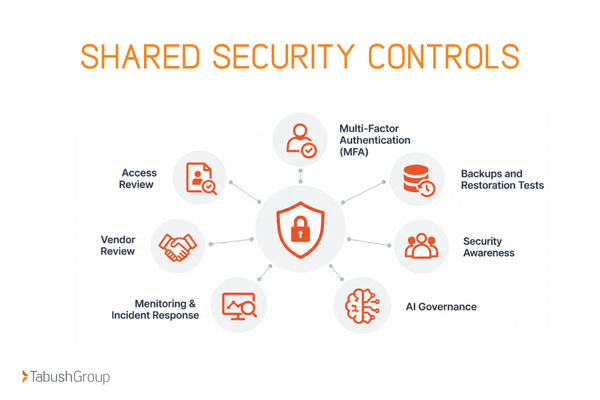
Multi-Factor Authentication (MFA)
MFA requires an additional verification step when users sign in. Firms should review where MFA is enabled, which accounts may be exempt, and how their authentication methods are managed.
Access Review
Review employee access permissions to confirm that each person's level of access matches their responsibilities. Review permissions periodically, especially when employees change roles or leave the firm.
Backups and Restoration Tests
Backups should cover your business-critical information and systems according to your firm's recovery requirements.
Regular restoration tests help determine whether information can be recovered and whether recovery procedures are practical.
Security Awareness
Employees should receive training on how to recognize and respond to common security risks, including suspicious messages, credential theft, unsafe file sharing, and fraudulent payment requests.
Monitoring & Incident Response
Define how potential incidents are identified, investigated, escalated, and documented. Assign responsibilities for technical response, leadership communication, and any required external notifications.
Vendor Review
Review how vendors access your firm's systems, handle sensitive information, and communicate about security incidents.
AI Governance
As employees use AI tools such as Microsoft Copilot, ChatGPT, and Claude for research, document drafting, and administrative tasks, firms need clear policies governing their use.
These policies should identify approved tools, define what company or client information employees may share, and assign responsibility for oversight. Firms using Microsoft 365 should also review existing file-sharing permissions and access controls before expanding AI adoption.
For firms developing a more structured approach to AI adoption, Tabush Group's FoundationAI addresses AI exposure assessments, governance policies, employee training, and ongoing oversight.
Industry-Specific Compliance Considerations
|
Industry |
Areas to review |
Relevant guidance or obligations |
|
Legal |
Client confidentiality, document access, retention, secure communication |
Applicable state bar rules and ABA Model Rule 1.6 |
|
Financial services |
Customer information, supervision, recordkeeping, vendor oversight |
Applicable SEC, FINRA, and Gramm-Leach-Bliley Act requirements |
|
Accounting |
Taxpayer information, financial records, secure file sharing |
Applicable FTC Safeguards Rule and IRS taxpayer data guidance |
|
Real estate |
Transaction documents, wire instructions, personal information |
Applicable privacy laws, transaction requirements, and contractual obligations |
|
Construction |
Client information, subcontractor access, project platforms |
Contractual security requirements and applicable industry or government standards |
|
Nonprofit |
Donor information, payment processing, volunteer access, grant data |
Applicable privacy laws, payment security requirements, and grant conditions |
Leadership should work with qualified legal, compliance, and technical professionals to determine which requirements apply and how they should be addressed.
A Practical 12-Month IT Strategy Roadmap
A 12-month IT roadmap organizes technology improvements into manageable phases, beginning with an assessment of current systems and risks. From there, firms can address priority issues, modernize technology, and measure progress while scheduling changes around important business deadlines.
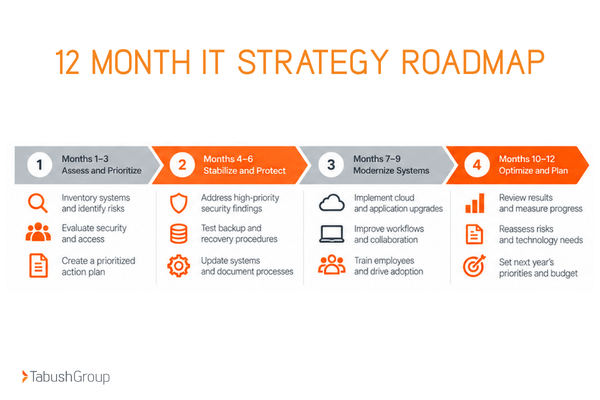
The following four-phase framework can be adapted to your firm's size, resources, and operating requirements.
Months 1–3: Assess and Prioritize
The first phase establishes a baseline for IT strategic planning. Leadership should use the findings to understand where technology supports current operations, where improvements are needed, and which issues require the most immediate attention.
Recommended activities:
- Inventory systems, applications, devices, and vendors
- Review cybersecurity controls and access permissions
- Identify recurring support problems and operational bottlenecks
- Evaluate backup, recovery, and business continuity procedures
- Review upcoming business changes and technology requirements
- Rank findings by risk, urgency, business impact, and implementation effort
- Assess Microsoft 365 configuration, user permissions, and security settings
Outputs: Current-state IT assessment, risk register, prioritized action list, and initial project budget.
Owner: Executive sponsor, IT lead or partner, and department representatives.
Dependencies: Department input, system documentation, and access to existing IT records.
Decision gate: Leadership approves the highest-priority improvements and assigns owners.
KPIs: Percentage of critical systems inventoried and percentage of high-priority findings assigned an owner.
Months 4–6: Stabilize Controls and Continuity
Once the firm understands its current environment, the next phase focuses on addressing priority issues and improving operational reliability.
Recommended activities:
- Address high-priority security and infrastructure findings.
- Review employee access and administrative permissions.
- Test recovery procedures for critical systems.
- Update devices, applications, and infrastructure where necessary.
- Document support escalation and incident response procedures.
- Resolve recurring technology issues affecting productivity.
Outputs: Remediation records, recovery test results, updated standards, and documented responsibilities.
Owner: IT lead or partner, security owner, and affected department managers.
Dependencies: Completed IT assessment, approved priorities, and assigned resources.
Decision gate: Confirm that critical issues have been addressed or formally accepted, with remaining risks documented.
KPIs: Priority-risk remediation completion and successful recovery tests.
Months 7–9: Modernize Systems and Workflows
With priority risks addressed, the firm can begin implementing approved technology projects. These changes should be coordinated with department leaders to account for application dependencies, employee readiness, and business deadlines.
Cloud migrations, application upgrades, and infrastructure changes should be scheduled around major business deadlines to reduce disruption to daily operations.
Recommended activities:
- Evaluate cloud and application modernization opportunities.
- Prioritize projects based on operational value and implementation effort.
- Review application compatibility and integration requirements.
- Pilot significant changes with a smaller group of users.
- Train employees on updated systems and procedures.
- Monitor adoption and resolve issues following implementation.
Outputs: Completed pilot projects, implementation documentation, employee training materials, and adoption reports.
Owner: IT project lead, business process owner, and department managers.
Dependencies: Critical risks addressed, approved budget, and confirmed application compatibility.
Decision gate: Approve broader implementation after reviewing pilot results, security considerations, and employee readiness.
KPIs: Approved tool adoption and completed modernization milestones.
Months 10–12: Optimize and Reset the Next-Year Roadmap
The final phase evaluates the year's progress and establishes priorities for the next planning cycle. Leadership should consider upcoming changes such as hiring, office expansion, new applications, regulatory developments, or shifts in client requirements.
Recommended activities:
- Review technology performance against established measures.
- Evaluate completed projects and outstanding issues.
- Reassess cybersecurity and operational risks.
- Compare planned and actual technology spending.
- Gather feedback from department leaders and employees.
- Update priorities and approve the following year's roadmap.
Outputs: Annual IT strategy review, updated risk register, proposed investment plan, and next-year roadmap.
Owner: Executive sponsor, finance leader, and IT lead or partner.
Dependencies: Project performance data, updated risk assessments, and department feedback.
Decision gate: Leadership approves next-year priorities, responsibilities, and budget.
KPIs: Roadmap milestone completion and percentage of open priority risks with approved action plans.
|
Timeline |
Primary focus |
Key output |
Leadership decision |
|
Months 1–3 |
Assess and prioritize |
Assessment and ranked action plan |
Approve priorities |
|
Months 4–6 |
Stabilize and protect |
Remediation and recovery documentation |
Review remaining risks |
|
Months 7–9 |
Modernize |
Completed projects and adoption results |
Approve rollout |
|
Months 10–12 |
Optimize |
Annual review and updated roadmap |
Approve next-year plan |
How to Prioritize IT Projects
Firms often have more potential technology projects than their available budget and resources can support. A simple scoring method can help leadership compare projects consistently.
Rate each proposed initiative from 1 (low) to 5 (high) across four categories:
|
Evaluation factor |
Question to consider |
|
Business impact |
How significantly does the issue affect employees, clients, or operations? |
|
Security and compliance risk |
What are the potential consequences of leaving the issue unresolved? |
|
Urgency |
Is there a deadline, unsupported system, or immediate operational need? |
|
Implementation readiness |
Are the budget, resources, dependencies, and timing appropriate? |
Projects with high business impact, significant security risks, or immediate deadlines may require earlier attention. Leadership should also consider resource availability and technical dependencies when determining when each project can begin.
The scoring exercise should support leadership discussions and technical judgment rather than automatically determine investment decisions.
Plan Technology Changes Around Client Work
Planning an IT roadmap can be challenging for professional services firms because client work and important deadlines continue throughout the year.
IT improvements require careful scheduling, testing, and communication. Before implementing a significant change, consider the following:
- Which employees and applications will be affected
- How long the work may take
- What procedures will be available if problems occur
Your roadmap should account for pilot testing, employee communication, and clearly assigned project owners.
How to Measure Your IT Strategy
An IT strategy should include measurable indicators that show whether technology improvements are supporting the firm's operations.
Leadership can use a simple scorecard to monitor system reliability, support performance, business continuity, cybersecurity, technology adoption, and project progress.
IT Strategy Performance Scorecard
|
Performance measure |
What to track |
Why it matters |
|
System reliability |
Critical system outages and recurring disruptions |
Identifies problems affecting client work |
|
Support performance |
Average resolution time by issue severity |
Shows how effectively IT issues are addressed |
|
Business continuity |
Successful backup restoration and recovery tests |
Evaluates recovery readiness |
|
Cybersecurity |
Status of priority-risk remediation |
Tracks progress on identified risks |
|
Technology adoption |
Employee use of approved applications |
Indicates whether improvements are being adopted |
|
Project progress |
Completed milestones against the approved roadmap |
Measures implementation progress |
Review these measures quarterly with the firm's IT lead or technology partner.
When results fall short of expectations, determine whether priorities, resources, or implementation plans need to change. Establish targets based on the firm's operational requirements and current performance.
Build an IT Strategy That Supports Your Firm's Goals
A well-developed IT strategy helps professional services firms make informed technology decisions, allocate resources, and prepare for changing business needs.
Start by understanding your existing systems, identifying operational priorities, reviewing security requirements, and determining who will manage each responsibility. From there, a 12-month roadmap provides a practical schedule for improvements and ongoing evaluation.
Tabush Group is a trusted IT partner for professional services firms, helping organizations manage complex technology challenges through secure cloud-based solutions aligned with their business needs.
By specializing in professional services firms, we are able to tailor our solutions to the specific needs of law firms, financial services firms, accounting practices, real estate companies, construction companies, and nonprofit organizations.
Ready to evaluate your firm's technology? Explore Tabush Group's 360 IT Assessment to gain a clearer understanding of your current IT environment and opportunities for improvement.
FAQs
What should an IT strategy include for a professional services firm?
An IT strategy should include business objectives, infrastructure, cybersecurity, applications, data management, business continuity, IT support responsibilities, and investment priorities. It should also establish a documented roadmap with project owners, timelines, and measurable outcomes that reflect the firm's operational needs.
How often should a professional services firm update its IT strategy?
Professional services firms should review their IT strategy at least annually and assess progress quarterly. Additional reviews may be appropriate following significant business changes, new regulatory requirements, security incidents, office expansions, or major technology investments.
Should a firm use in-house, co-managed, or managed IT?
The appropriate IT support model depends on the firm's staffing, technical requirements, internal expertise, and preferred level of control. In-house IT provides direct management, co-managed IT combines internal and external resources, and fully managed IT delegates agreed operational responsibilities to an external partner.
How can a firm create a 12-month IT roadmap?
Begin with an IT assessment to identify existing systems, operational problems, security risks, and business priorities. Organize improvements into four phases: assessment, stabilization, modernization, and optimization. Assign owners, establish milestones, identify dependencies, and review progress quarterly.
What compliance considerations should professional services firms review?
Firms should evaluate applicable privacy laws, professional confidentiality obligations, data retention requirements, cybersecurity standards, and contractual responsibilities. Specific requirements vary by industry and business activities. Legal, financial services, accounting, real estate, construction, and nonprofit organizations may each have different obligations.
How can a firm upgrade IT without interrupting client work?
Schedule technology changes around major business deadlines, test updates before broader deployment, and communicate with affected employees. Prioritize critical systems, prepare recovery procedures, and implement changes in manageable phases. Monitoring performance after each change helps identify issues before additional upgrades begin.