IT for accountants should support the way a firm actually works. Technology, security, process, and support decisions that are disconnected from accounting workflows create downtime, lost staff time, compliance exposure, and client-service risk.
Those problems become especially expensive during tax season, audit deadlines, and other high-pressure periods. A single issue may call for a targeted fix, while several issues appearing together can point to a broader IT management problem.
Here are 10 common mistakes to look for and practical ways accounting firms can address them.
1. Treating IT As A Generic Help Desk Instead Of An Accounting Workflow System
Accounting firms lose time when technology support is disconnected from the applications, deadlines, and workflows staff rely on every day.
What It Costs
Your team has to send repeated tickets because the provider fixes symptoms without understanding why QuickBooks, Drake, Lacerte, UltraTax, CCH, Sage, Microsoft 365, or a client portal is creating problems for a specific workflow.
Your staff ends up wasting billable time explaining tax software, client portals, or remote-work requirements to generalists.
Technology decisions may prioritize devices over the tax, audit, CAS, and advisory workflows those devices need to support.
How To Fix It
Map critical workflows, applications, owners, dependencies, and deadline periods. Require the IT model to support the business workflow, including the applications, dependencies, integrations, and service needs behind it.
Use an accounting-specialized managed or co-managed partner where application and workflow expertise is missing.
2. Waiting Until Tax Season To Fix Capacity And Performance Problems
The busiest weeks are the worst time to discover that servers, remote access, tax applications, or support escalation cannot handle peak demand.
What It Costs
Slow logins, application lag, unreliable remote access, and overwhelmed support queues can affect the whole firm at once. Seasonal hires may also struggle to get secure access quickly, creating additional delays.
An outage near a filing deadline can quickly turn into overtime, missed commitments, and client frustration.
How To Fix It
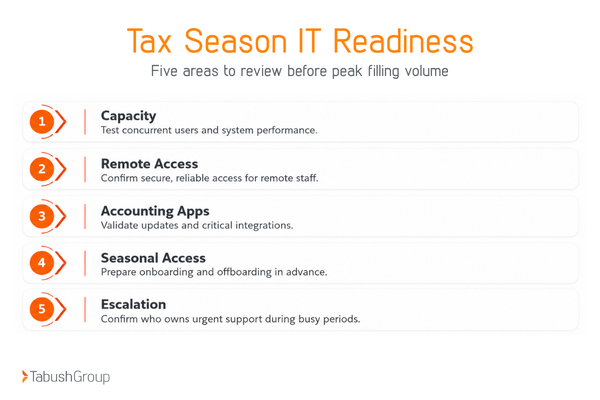
Run a pre-season readiness review before peak filing volume. Test concurrent users, remote access, application updates, internet redundancy, and escalation contacts.
Plan temporary capacity, onboarding, and offboarding for seasonal staff before they arrive. Leadership should also understand what IT downtime can cost the firm before busy season begins.
3. Keeping Outdated Hardware, Operating Systems, Or Accounting Software In Production
Unsupported or aging technology creates a double cost: slower work today and greater security or compatibility risk tomorrow.
What It Costs
Staff lose time repeatedly to slow performance, crashes, freezing, and application conflicts as old versions can create patching, integration, browser, printer, or tax-software compatibility problems.
A forced replacement during busy season is more disruptive than a planned lifecycle change.
How To Fix It
Maintain a hardware and software lifecycle inventory with end-of-support dates. Schedule routine maintenance and upgrades during low-risk periods and off-hours. Test critical accounting applications before deployment.
Include lifecycle replacement in the annual technology roadmap and budget, along with decisions about your firm’s cloud strategy.
4. Assuming That Having Backups Means The Firm Can Recover
A backup is only useful if the firm can restore the right data and systems quickly enough to meet business deadlines.
What It Costs
During an incident, a firm may discover its backups are incomplete, corrupted, inaccessible, or tied to the same environment affected by an incident.
In some cases, no one knows which systems should be restored first because the recovery order has not been documented.
Recovery during an outage becomes a trial-and-error exercise, leaving staff and clients on hold.
How To Fix It
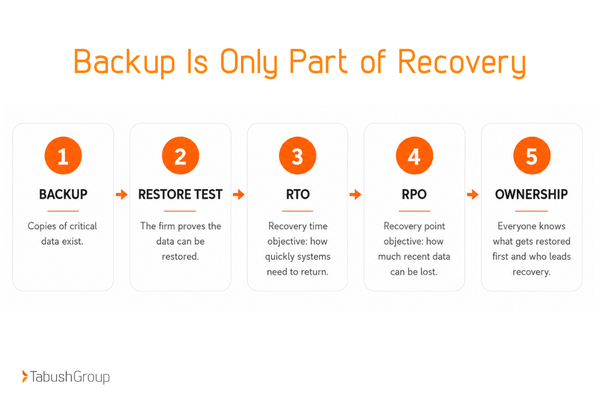
Run documented restore tests on a schedule and record results. Define a recovery time objective (RTO), or how quickly a system needs to be restored, and a recovery point objective (RPO), or how much recent data the firm can afford to lose, for each critical system.
Know who owns recovery, what gets restored first, and how staff will work while systems are unavailable.
5. Stopping Cybersecurity At Antivirus And MFA
Multi-factor authentication (MFA) and endpoint protection are important controls, but accounting firms still need layered identity, email, endpoint, monitoring, access, and incident-response practices.
What It Costs
Former users, over-permissioned accounts, and poorly protected email create paths around basic controls. Those gaps can make it easier for phishing attacks or stolen credentials to expose sensitive client information.
A checklist mindset can leave the firm confident without knowing whether controls are actually working.
How To Fix It
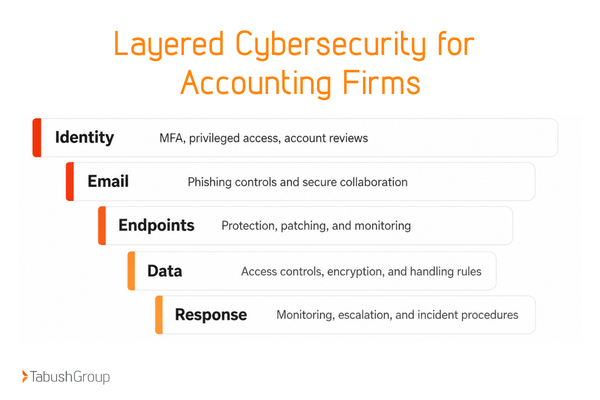
Use layered controls across identity, email, endpoints, data, and network access. Review privileged accounts and access regularly, train staff, monitor security events, and define an incident-response process rather than relying on tools alone.
For organizations covered by the FTC Safeguards Rule, FTC guidance describes administrative, technical, and physical safeguards as part of an information security program.
6. Treating The WISP As Paperwork Instead Of An Operating Security Plan
For tax professionals, a Written Information Security Plan (WISP) should reflect the controls and processes the firm actually uses to protect taxpayer information.
What It Costs
Policies can drift away from real systems, vendors, staff roles, and access patterns. This makes security questionnaires or client requests harder to answer with evidence.
The firm may discover gaps only after an incident or a review, resulting in penalties and fines.
How To Fix It
Assign ownership, update the plan when systems or risks change, and connect written policy to real technical controls.
Current IRS Security Summit guidance states that tax professionals are required to have a WISP, and the IRS points practices to Publication 4557 and its WISP resources for safeguarding taxpayer data.
Have IT document the controls it manages, and consult legal counsel for compliance guidance.
An independent 360 IT Assessment performed every 1-3 years can help identify technology and security gaps that should be prioritized.
7. Allowing AI Tools To Touch Client Data Without Governance
AI can improve productivity, but unmanaged use creates a new class of data-handling, accuracy, and accountability problems for accounting firms.
What It Costs
Staff may paste client information into unapproved public tools. Different teams may use different AI products with no common rules for retention, access, or review.
There is also a risk that AI-generated work can be accepted without a qualified human checking the output.
How To Fix It
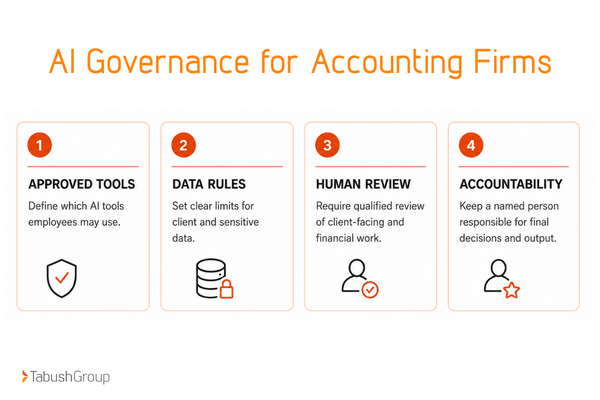
Publish an approved tool or tools and data-handling policy for AI that defines what information may never be entered into public AI systems.
Require human review for client-facing or financial work, and maintain clear ownership for final decisions.
8. Letting Too Many IT Vendors Share Responsibility Without a Single Owner
Vendor sprawl turns ordinary problems into long handoffs when hosting, cybersecurity, backup, local support, and software vendors each own only one piece of the environment.
What It Costs
Staff members can end up acting as project managers between vendors during an outage, contacting multiple providers while each investigates its own part of the environment.
Overlapping tools and contracts create unnecessary costs, while unclear ownership allows root-cause issues to linger because each provider can point to another layer.
How To Fix It
Document which vendor owns each system and escalation path. Review overlapping tools and contracts and consolidate services where doing so improves accountability and simplifies the environment.
Most importantly, assign one internal or external technology lead who owns the end-to-end outcome.
For firms looking to reduce vendor sprawl, Overture cloud management can consolidate cloud services with a single provider.
9. Keeping Internal IT Trapped In Reactive Tickets
When an internal IT lead spends the day resetting passwords, chasing vendors, and resolving repeat issues, the firm pays twice: for the tickets and for the strategic work that never happens.
What It Costs
Roadmaps, automation, cybersecurity projects, and platform improvements keep getting postponed. The internal IT person can also become a bottleneck when too much knowledge and responsibility sits with one person.
Over time, partners see IT mainly as a cost center because strategic outcomes are invisible.
How To Fix It
Identify repeatable support and monitoring work that can be shared with a co-managed partner.
With co-managed IT, your internal IT can retain control of business context, priorities, and strategy while gaining added capacity. This gives your internal team time to focus on roadmap, automation, governance, and business improvement.
10. Skipping Regular IT Assessments And Roadmap Reviews
Without a recurring assessment and roadmap, small technology risks accumulate until the firm is forced into rushed, expensive decisions.
What It Costs
Leadership lacks a shared view of aging systems, security gaps, vendor overlap, or upcoming investments. Partners may receive surprise technology requests they see as just another expense rather than a prioritized plan.
It can also become difficult to tell which problems are isolated and which point to a broader architecture or process issue.
How To Fix It
On a recurring cadence, review technology, security, vendors, processes, and business priorities, then prioritize findings by business impact, urgency, and effort.
Turn the findings into a 12- to 24-month roadmap rather than a one-time punch list. These questions to ask during an IT assessment can help structure the review.
For firms seeking a broader diagnostic, a 360 IT Assessment can provide a prioritized view of the environment that leadership can use with its existing team or future technology partners.
Address IT Problems Before The Busy Season
Recurring productivity loss, unclear ownership, weak recovery readiness, and reactive decisions often become the most expensive IT problems because they compound throughout the year.
If three or more mistakes feel familiar, the next step is to get a clear view of the environment before the next busy season.
Effective IT for accountants should match the firm’s workflows, capacity, and security needs. When additional expertise or capacity is needed, the right IT partner can help close those gaps.
Tabush Group works as an experienced IT partner for accounting firms that need additional technology expertise, capacity, and support. Learn more about accounting-focused IT support, or start with a 360 IT Assessment when the first priority is understanding the current environment and building a practical roadmap.
Frequently Asked Questions
What are the most common IT mistakes accounting firms make?
Common mistakes include relying on reactive support, weak recovery, outdated systems, security and compliance gaps, and unclear IT ownership between internal IT and outside vendors. Effective IT for accountants should address both technology and the workflows it supports.
How can accounting firms reduce IT downtime during tax season?
Accounting firms should prepare before peak volume. This means pre-season capacity testing, carefully scheduling updates, recovery testing, and escalation planning.
Accounting-software-aware support can also help shorten troubleshooting time when a problem occurs.
What is a WISP for an accounting or tax firm?
A Written Information Security Plan documents how a practice protects sensitive information and manages security responsibilities. Current IRS guidance states that tax professionals are required to have a WISP and directs firms to Publication 4557 and dedicated WISP resources for guidance.
When should an accounting firm use co-managed IT?
Co-managed IT can fit firms that have an internal IT person or small team but need added capacity, cybersecurity depth, monitoring, project support, or after-hours coverage. The internal team retains business context and strategic ownership while gaining additional resources.
How often should an accounting firm review its IT environment?
Accounting firms should use a recurring formal review cadence and conduct additional reviews after major growth, mergers, new offices, security events, or major platform changes. The right review cadence depends on the firm’s environment and business needs. The goal is to identify priorities early enough to plan rather than react.