M365 governance is the set of policies, roles, and technical controls a law firm uses to manage access, sharing, retention, collaboration, and security across Microsoft 365.
For law firms, Microsoft 365 governance affects client files, privileged communications, outside collaboration, remote work, and matter-specific access.As firms grow, users, groups, guests, permissions, Teams, SharePoint sites, apps, and policies accumulate over time. The result is governance drift, where the current environment no longer fully reflects the firm’s policies or workflows.
A review of seven key areas can help a firm understand its current Microsoft 365 environment, identify gaps, and decide whether a more comprehensive Microsoft 365 Assessment would be useful. Firms that need broader ongoing support may also want managed IT services for law firms.
Key Takeaways
-
M365 governance helps law firms control access, sharing, retention, collaboration, and security across Microsoft 365.
-
Governance drift can build over time as users, permissions, guest accounts, Teams, SharePoint sites, apps, and policies change.
-
Law firms should regularly review seven core governance areas, including identity and access, external sharing, data protection, retention, matter lifecycle, and AI readiness.
-
A Microsoft 365 governance assessment should identify gaps and turn findings into a prioritized roadmap that leadership and IT can act on.
Why M365 Governance Matters More For Mid-Sized Law Firms
For a mid-sized law firm, Microsoft 365 governance affects who can access client information, how the firm shares it, how long it keeps it, and what it can show when a client, insurer, auditor, or leadership team asks how it controls access.
M365 supports many parts of your teams’ work with Office, Teams, SharePoint, OneDrive, Entra ID, and Purview, along with the mobile devices and third-party apps people use to reach them. Mid-sized firms usually have enough scale to create permission and workspace sprawl, but often do not have a dedicated M365 governance team.
Because law firms handle confidential client information, their Microsoft 365 governance should account for applicable ethical, contractual, and regulatory requirements.
ABA Model Rule 1.6(c) states lawyers must make reasonable efforts to prevent unauthorized access or disclosure of client information. Comment 18 discusses factors that can affect what constitutes reasonable efforts. Comment 8 to ABA Model Rule 1.1 also addresses keeping abreast of the benefits and risks associated with relevant technology.
These ethical standards provide useful context for firms evaluating their cybersecurity controls.
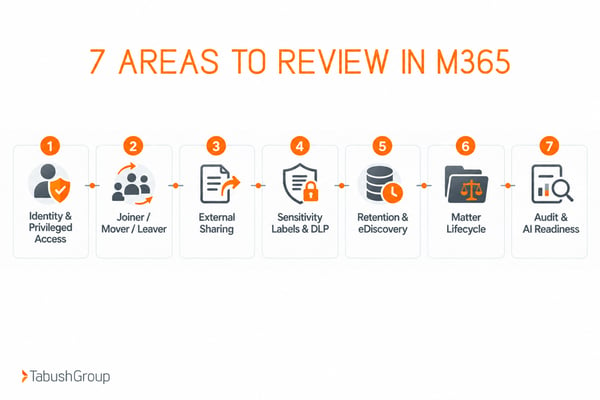
The 7 Areas Every Law Firm Should Review In Microsoft 365
A useful M365 governance review should cover seven connected areas, because a weakness in one can undermine controls elsewhere.
1. Identity And Privileged Access
Review multifactor authentication (MFA) coverage, roles, emergency accounts, stale accounts, and whether access matches current job responsibilities.
Conditional Access uses signals such as the user, device, location, or application to determine what requirements must be met before access is granted. This can help your law firm limit access to client information by requiring more authentication or approved devices when the risk is higher.
Pay particular attention to privileged roles, such as Global Administrator. Administrative access should have a documented business purpose and be reviewed periodically.
“Done” means privileged access is limited, documented, and periodically reviewed.
2. Joiner, Mover, And Leaver Processes
A change in an employee's status should trigger a review of their access. Review how:
- New employees receive access
- Lateral moves or role changes alter permissions
- Departures remove access across Microsoft 365 and connected apps
When designing these processes, account for the entire team, including attorneys, contractors, temporary staff, and vendors.
3. External Sharing And Guest Access
Law firms routinely collaborate with clients, co-counsel, experts, and vendors, so the answer cannot simply be “turn sharing off.” External sharing requires clear governance.
Review guest accounts, SharePoint and OneDrive sharing defaults, Teams guests, anonymous links, expiration, and recurring access reviews.
Microsoft Entra access reviews can be used to periodically evaluate whether guest users still need access to groups and applications.
4. Data Classification, Sensitivity, and Data Loss Prevention
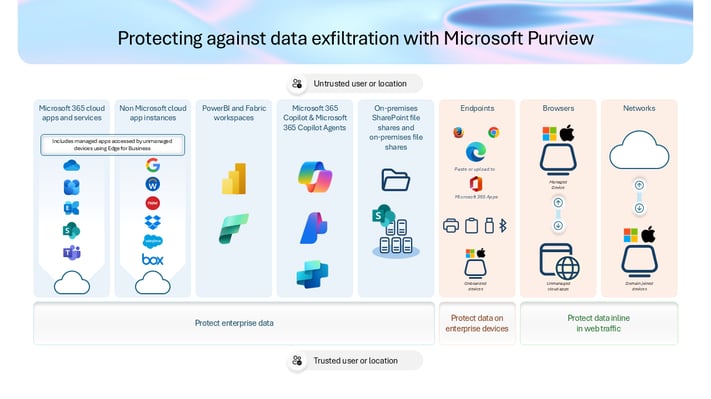
As a law firm, you need to know where your data is stored and how it's protected in M365. Microsoft Purview includes capabilities for information protection and governance.
- Sensitivity labels can classify information and help protect information based on its sensitivity.
- Data loss prevention (DLP) policies can identify certain sensitive information and apply rules to how that information is handled.
Review whether the firm has defined sensitive information types, sharing restrictions, and policies that reflect the data it actually handles.
5. Retention, Records, Legal Hold, and eDiscovery
Review retention policies, records rules, litigation hold processes, eDiscovery workflows, former-user data, and whether legal or records stakeholders own the policy.
eDiscovery refers to the processes and tools used to identify, preserve, collect, and review electronically stored information for legal matters.
Microsoft 365 configuration can support the firm’s retention and eDiscovery processes, but your firm remains responsible for determining and documenting the requirements that apply to its work.
6. Teams, SharePoint, OneDrive, and Matter Lifecycle
Collaboration spaces should follow the lifecycle of the work they support. Review how Teams, SharePoint, OneDrive, and other workspaces are created, owned, and shared.
Look at naming standards, ownership, stale Teams and sites, duplicate matter spaces, workspaces with no active owner, archived matters, and how long workspaces stay active after a matter closes.
Matter lifecycle is particularly important for law firms. When a matter opens, the firm may create a Team or SharePoint site and grant access to attorneys, staff, clients, co-counsel, or experts. When the matter closes, ownership, outside access, retention, and the status of that workspace may need to change.
7. Monitoring, Audit, App Access, and AI Readiness
Review audit logging, risky sign-ins, OAuth and other app consent, third-party integrations, and security alerts.
AI readiness starts with well-governed access and data. Before rolling out Microsoft 365 Copilot across your firm, review sharing, sensitivity labels, stale content, and permissions.
6 Signs Your Law Firm Has M365 Governance Drift
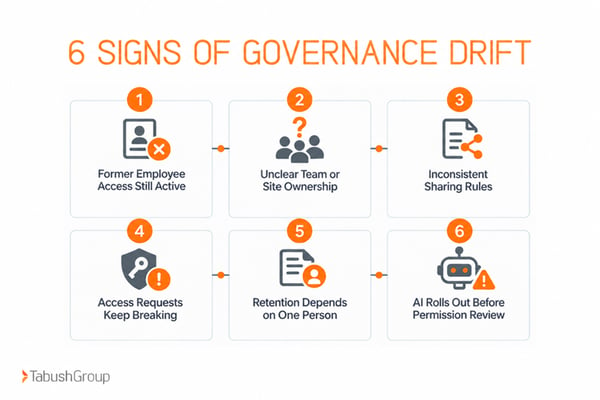
Governance drift usually appears as recurring operational problems before it appears as a formal finding.
- Former employees or old guest accounts still exist long after access should have ended.
- Nobody can explain who owns a Team, SharePoint site, or Microsoft 365 Group.
- External sharing rules differ by department or site with no documented reason.
- Attorneys ask IT for access that “used to work,” suggesting role and matter permissions have accumulated inconsistently.
- Retention, legal hold, or eDiscovery settings depend on one person’s memory rather than written ownership and process.
- Copilot or another AI initiative is moving forward before the firm has reviewed permissions, stale content, sensitivity, and sharing.
One or two signs do not automatically mean the tenant is poorly managed. They are a reason to review the current configuration and decision process.
A law firm IT assessment can provide broader technology context, while a Microsoft 365-specific review can focus closely on the tenant and its governance.
What A Microsoft 365 Governance Assessment Should Deliver
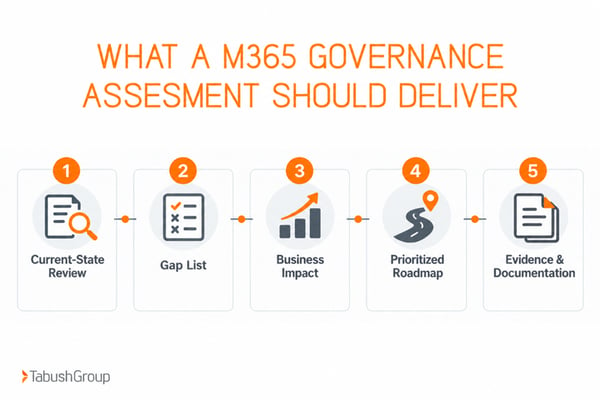
A useful M365 assessment should turn technical configuration into a prioritized management plan.
Current-State Review
The assessment should document the current state of identity, access, sharing, security, data governance, collaboration, audit, and administration.
Gap List
Clearly separate urgent security issues, governance inconsistencies, licensing and configuration opportunities, and process gaps.
Business Impact
Explain why each finding matters to client work, confidentiality, support load, or operational risk.
Prioritized Roadmap
Map out immediate, near-term, and longer-term recommendations with named owners or decision-makers.
Evidence
Documentation of what was reviewed and the basis for each finding so leadership and internal IT can use the report after the assessment ends.
Ready to review your Microsoft 365 environment? Learn more about Tabush Group’s Microsoft 365 Assessment.
Where Co-Managed IT Fits After The Assessment
Some firms can remediate M365 governance findings internally, while others need additional depth for policy design, implementation, monitoring, or ongoing review.
For firms with an in-house IT team, co-managed IT services add bench depth and specialized expertise while your internal team remains in control of the day-to-day. This model can be useful when the firm needs support with areas such as M365 governance, security baseline enforcement, identity hygiene, DLP, or after-hours coverage.
Not sure if co-managed IT is the right model for you? Read our blog, Co-Managed IT for Law Firms: When Your In-House IT Team Needs Backup.
Prepare Your Microsoft 365 Environment for 2027
M365 governance is an operating discipline across access, data, collaboration, records, and security.
As a law firm grows, governance drift can develop through normal changes in people, matters, applications, and Microsoft 365 itself. A scheduled review allows IT and firm leadership to evaluate whether the current environment still reflects the way the firm works.
A Microsoft 365 Assessment can provide a documented current-state review, identify gaps, and create a prioritized roadmap for the firm to evaluate.
Firms can also explore Tabush Group’s managed IT services for law firms, co-managed IT services, and broader cybersecurity capabilities based on their ongoing needs.
FAQs
What is Microsoft 365 governance for a law firm?
Microsoft 365 governance is the set of policies, roles, and technical controls a law firm uses to manage identity, access, sharing, retention, collaboration, security, and oversight across Microsoft 365. It defines who can access information, how data can be shared, how long content is kept, and who owns the decisions.
What should a law firm review in a Microsoft 365 assessment?
A law firm should review identity and privileged access, joiner, mover, and leaver processes, guest and external sharing, data loss prevention, sensitivity labels, retention and eDiscovery, Teams and SharePoint lifecycle, audit logging, third-party app access, and the controls that support AI or Copilot readiness.
How often should a law firm review Microsoft 365 governance?
There is no single schedule that fits every firm. A practical approach is to review high-risk access and security controls regularly and complete a broader governance review after major growth, mergers, platform changes, AI adoption, or material changes in client or regulatory requirements.
Does Microsoft 365 make a law firm compliant automatically?
No. Microsoft 365 includes security, records, audit, retention, eDiscovery, and information protection capabilities, but the firm is responsible for selecting, configuring, operating, and documenting the controls that apply to its legal, ethical, contractual, and regulatory obligations.