Construction companies run on coordination between the field and the office. A change order approved at headquarters has to reach the superintendent on site the same day, and a drawing marked up in the trailer has to sync back before the next pour. When that link breaks, the schedule pays for it, and money follows the schedule.
The technology behind that coordination keeps getting more complicated. Most companies now run project management, drawing markup, accounting, and email across separate cloud platforms, with crews working off tablets and phones spread across several job sites. Every one of those pieces adds a point where something can fail or be exposed.
This post walks through the eight construction technology challenges we see most often and what to do about them: multi-site connectivity, cybersecurity, mobile and BYOD risk, securing the software stack, subcontractor access, backup and continuity, AI adoption, and keeping IT budget predictable across an uneven pipeline.
Benefits of IT for Construction
By leveraging the right IT solutions, construction companies can experience many advantages:
-
Secure coordination between jobsites and the office so everyone can access the same files
-
Faster access to project drawings, RFIs, and change orders in the field
-
Continuity when a project server fails, or a device is lost
-
Cybersecurity for bid documents, contracts, and financial data
-
Predictable IT costs as the company scales across more projects
Technology without the right training or expertise can create its own problems.
Common Technology Challenges
These challenges show up across companies of every size, from a single-office general contractor to a multi-state builder. Most of them come down to making the systems that a construction company already runs work together securely.
#1: Multi-Site Connectivity Between Jobsites and the Office
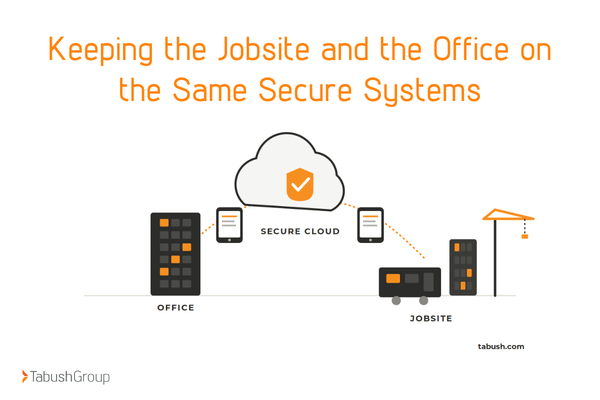
A typical mid-sized construction company has a headquarters, two to ten active job site trailers, project managers carrying tablets, and field crews on phones. All of them need to stay on the same secure systems.
When the trailer Wi-Fi goes down or the VPN times out, project schedules slip, and you pay for it.
The Solution
The first step is to ensure reliable connectivity at trailers, using dedicated circuits or cellular failover. Then add access back to office systems.
Many companies are turning to cloud applications that don't require on-site hardware at the jobsite. Tabush Group’s Desktop as a Service, Boxtop, delivers a full cloud desktop that your field staff can access anywhere, on any device, securely.
#2: Cybersecurity for Construction Companies
Construction companies face a specific threat profile. Business email compromise targets payment changes on draw requests and vendor invoices. Ransomware on a project server can halt a project schedule.
Subcontractor access creates short-term insider risk. Bid documents and contracts are high-value data that competitors and threat actors both want.
The Solution
Layered cybersecurity stack:
-
24/7 monitoring
-
Encrypted communications
-
Endpoint detection
Tabush Group's Guardian SOCaaS comes with all of Tabush Group’s solutions and delivers all of these protections to support cybersecurity for construction companies.
#3: Mobile Workforce, Tablets, and BYOD
Project managers, superintendents, and field crews are on tablets, laptops, and phones. A lost or stolen device containing bid documents, contracts, or project financial data becomes a breach overnight.
The Solution
A layered mobile security approach covers: mobile device management (MDM), remote wipe, encrypted device storage, a separate work profile on BYOD devices, and multi-factor authentication (MFA).
A written BYOD policy sets expectations before a device is ever lost. For companies that would rather keep no company data on the device at all, a Desktop as a Service setup keeps everything in the cloud, so a lost tablet is just hardware.
#4: Securing the Construction Software Stack
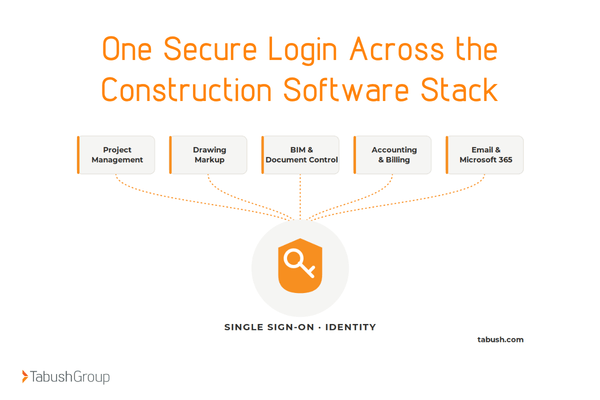
A typical construction company runs on several software platforms. For example:
-
Procore for project management
-
Bluebeam Revu for drawing markup
-
Autodesk Construction Cloud (or BIM 360) for BIM and document control
-
Sage 300 CRE or Sage Intacct for accounting and progress billing
-
Microsoft 365 for email and collaboration
Each platform creates its own login, its own access controls, and its own audit trail. Managing all of that without a coordinated identity strategy creates security gaps
The Solution
A single identity strategy ties these platforms together. To keep access secure and streamlined, incorporate single sign-on (SSO) across cloud applications, centralize identity management, perform regular access reviews, and eliminate unused licenses.
Tabush Group’s Overture is built to manage cloud platforms this way, giving your construction company one coordinated view of its applications in place of a dozen disconnected ones.
#5: Subcontractor and Vendor Access Management
Construction projects bring in dozens of subcontractors, suppliers, and consultants who need access to specific project folders for a finite period. Without disciplined access control, project files leak, contractors retain access after a project ends, and orphaned accounts pile up.
The Solution
Restrict access of third parties to the project, and based on the role, for example, a framing sub sees framing documents and nothing else. Create access with time limits that expire automatically, so you aren’t relying on someone to remember to revoke it.
Perform regular access reviews and keep audit logs so your company can know who accessed what
#6: Data Backup and Business Continuity
A single ransomware attack or hardware failure on a project server can halt the whole job. Construction companies operate on tight schedules, and a day of downtime can cost more than a year of IT investment.
The Solution
Keep cloud backups with off-site copies in case of an attack and regularly test recovery rather than assuming it works. Document a business continuity plan that clearly defines who does what, and practice with disaster recovery exercises.
Keeping cyber breach response plans ready is part of the same discipline.
#7: AI Adoption Without Training
94% of AEC companies currently using AI plan to further increase investment and use of AI in the next year. Contractor Magazine says that AI in the construction market is projected to top $13.5B by 2030. Construction companies are using AI for estimating, schedule analysis, drawing review, and document generation.
But without policy and training, employees feed sensitive bid data or client information into public AI tools, creating compliance and IP exposure.
The Solution
Develop a written AI use policy with an approved tool list, what data can and cannot be fed into AI systems, and governance around AI in client deliverables.
Then, host regular training for your staff on cybersecurity best practices when using AI. Train staff on the difference between a private, contained AI tool and a public one that may keep whatever it is given.
#8: Maintaining IT Budget Across an Uneven Project Pipeline
Construction is feast-or-famine. Revenue swings with the project pipeline, but IT costs need to stay predictable.
Capital purchases of hardware become risky in a down quarter. Subscription stacks pile up without anyone tracking what is actually being used.
The Solution
Shift from capital hardware purchases to operational expense via cloud (DaaS), giving you predictable monthly costs. Perform regular software stack reviews and get rid of what people aren’t using.
Managed service contracts can scale with seat count and the company's needs, so you aren’t stuck paying for what you don’t need. For companies that want senior IT direction without hiring a full-time IT director, managed IT services for construction companies can fill that role, and companies that already have internal IT staff can extend their team through Edge co-managed IT.
Overcome Challenges with Cloud and IT Solutions
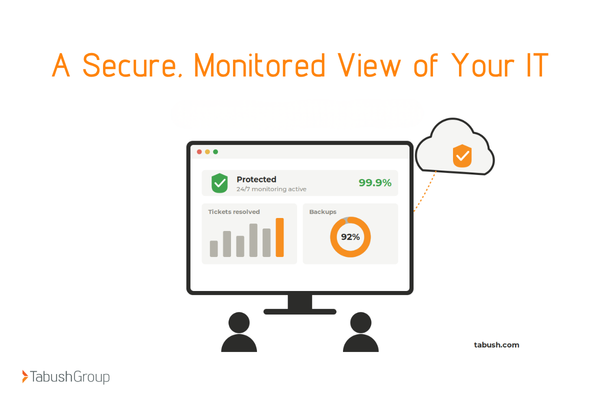
The construction industry is moving quickly, and companies that ignore the technology gap fall behind. A strategic IT approach catches problems before they cost projects, builds in security, and keeps IT spend predictable.
The next right step depends on your business. Some are best served by managed IT services, while others prefer Edge co-managed IT services. Many get the most value from moving day-to-day operations into cloud solutions that take the hardware burden off the jobsite.
If your construction company wants an independent read on where its IT stands, a 360 IT Assessment is a great start.
Frequently Asked Questions
What are the biggest IT challenges facing construction companies?
The most common construction technology challenges are keeping jobsites and the office connected on the same secure systems, defending against email fraud and ransomware, managing mobile and personal devices in the field, securing a stack of separate cloud platforms, controlling subcontractor access, backing up data for fast recovery, adopting AI safely, and keeping IT costs predictable as the project pipeline rises and falls. Most come down to coordination and security, not to buying more software.
How do construction companies protect against cyberattacks?
Construction companies protect themselves by building security in layers. That includes multi-factor authentication on every account, 24/7 monitoring, encrypted communications, and endpoint detection on field devices.
Because business email compromise often targets draw requests and vendor payments, companies should verify any payment change through a second channel. A written and tested breach response plan limits the damage when something does get through. Many companies outsource this to a managed security provider instead of staffing it in-house.
What software does a typical construction company run, and how do you secure it?
A typical construction company runs project management (often Procore), drawing markup (Bluebeam Revu), BIM and document control (Autodesk Construction Cloud), accounting (Sage 300 CRE or Sage Intacct), and Microsoft 365 for email.
Each platform has its own login and permissions, which creates security gaps when they are managed separately. The fix is a single identity strategy: single sign-on across applications, central management of who has access, and regular reviews that close unused or expired accounts.
How do you handle IT between the office and the jobsite?
Jobsite IT works best when the trailer has reliable connectivity, usually a dedicated circuit with cellular failover, so one outage does not cut the site off. Field staff then reach office systems through secure remote access.
Many construction companies go further and move applications into a cloud desktop, so project managers and crews work from current files on any device without depending on hardware at the trailer. That setup also makes a lost or stolen device far less of a risk.
What is co-managed IT for construction companies?
Co-managed IT is a setup where a construction company keeps its internal IT staff and brings in an outside provider to share the work. The internal team handles day-to-day requests and company knowledge, while the provider adds security monitoring, after-hours coverage, specialized skills, and senior direction.
It suits companies that have outgrown a one-person IT department but are not ready to outsource everything. The two teams split responsibilities based on what each does best.
How often should a construction company assess its IT?
A construction company should review its IT at least once a year, and again after any major change, such as winning a much larger project, opening a new office, or going through a merger. An annual IT assessment checks security controls, backup and recovery, software licensing, and how well field and office systems work together.
Companies that have never had an independent assessment should start with one now, since it sets a baseline to measure future progress against.