Real estate IT modernization is the process of upgrading a firm’s infrastructure, cloud access, security, and business applications while preserving the workflows staff need to move deals through closing.Real estate technology touches nearly every part of a transaction.
Agents need access to files from the field.
Operations teams rely on email, e-signature, and document management.
Finance teams need accounting systems and payment information available when deadlines arrive.
Aging systems create support and security problems, and a poorly timed migration can interrupt access to transaction files, email, e-signature, or line-of-business applications.
That makes timing a major part of any technology upgrade. In this guide, we will provide a phased plan focused on continuity, testing, and staff readiness.
For firms evaluating their current environment, IT services for real estate firms can support the planning, migration, security, and ongoing management involved in modernization.
Why Real Estate IT Modernization Is Harder Than A Normal Upgrade
Real estate firms cannot plan technology changes around a “slow period” because transactions, lease activity, and client communication continue year-round, and important dates are always changing.
Distributed Users
A real estate firm may have employees working across many locations, including brokers in the office, agents visiting properties, property teams working on-site, leasing staff, executives, and finance staff handling transactions.
Each person needs reliable access to the systems required for their job, wherever they are working.
Workflow Dependencies
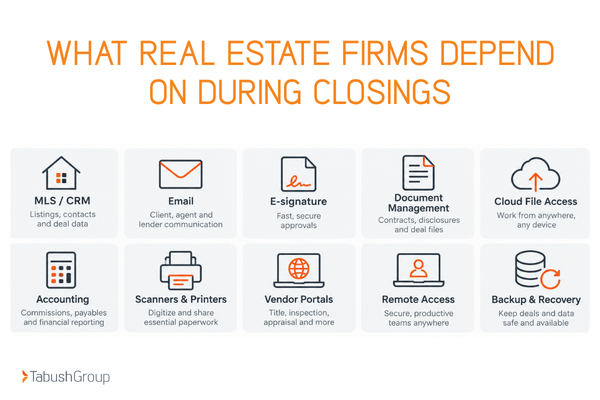
MLS platforms, CRM software, e-signature tools, document management systems, accounting applications, cloud file storage, email, scanners, printers, and vendor portals can support transactions from start to close.
A change to one system can affect another part of that workflow.
Transaction Timing
Closing dates, lease deadlines, funding dates, and payment instructions create business deadlines IT cannot ignore.
Sensitive Data
Real estate firms handle a lot of sensitive data, including contracts, IDs, financial information, banking details, and transaction records, which require access controls and secure sharing.
NAR provides additional data privacy and security guidance for real estate professionals handling sensitive client and transaction information.
A technology project should account for these workflows from the beginning. The right IT partner should have experience with real estate firms and support the mix of mobile access, cloud systems, security, and day-to-day support that these environments require through managed IT and cloud solutions for real estate.
Start With A Workflow And Dependency Map
The safest modernization plan starts with the work people must complete, then maps the technology that supports each step.
-
List critical workflows: prospect to listing/lease, contract review, document exchange, approvals, payment instructions, closing, post-close record storage
-
Inventory applications, logins, integrations, devices, network locations, shared folders, and third-party vendors
-
Identify business-critical windows and blackout dates: include planned closings, month-end, quarter-end, major leasing events, and audit periods
- Define what must remain available during cutover and what can tolerate a short maintenance window.
A 360 IT Assessment can provide a baseline view of a firm’s IT environment and help identify areas that may need attention. The assessment is designed to provide findings and a roadmap that a firm can use with its current IT resources or another provider.
Use A 6-Step Phased Modernization Plan
A phased rollout reduces operational risk because every change is tested before it reaches the full firm.
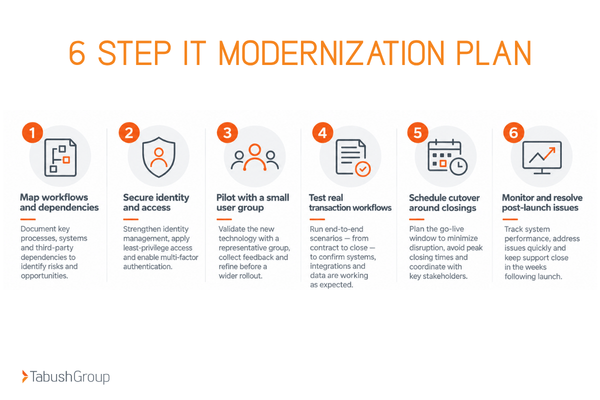
1. Set The Business Success Criteria
Define what a “good” migration means in user terms.
For example:
-
Files open quickly
-
Remote access works
-
Transaction apps connect
-
Documents can be printed and scanned without workflow issues
-
Support has a clear escalation path
Document those requirements before technical work begins. They become the standard used during testing.
Done when: The project team has a written list of critical workflows, expected performance, and support requirements.
2. Fix Security And Identity
Before moving core systems, confirm:
-
User permissions
-
Device security
-
Email protections
-
Backup coverage
-
Recovery procedures
- Secure external sharing
Email security deserves particular attention in real estate because payment instructions and transaction communications may be targeted through business email compromise and wire fraud schemes. The National Association of REALTORS® recommends independently verifying wiring instructions using a trusted phone number before funds are transferred.
Done when: Identity, access, email, device, sharing, and backup requirements have been documented and tested.
3. Pilot With A Small Group
Select a pilot group that represents the way the firm actually works. Choose users who represent office-based, remote, finance, and transaction workflows.
A pilot gives the IT team time to uncover application, permissions, performance, or workflow issues before broad rollout.
Done when: Pilot users can complete their normal work and documented issues have been resolved or assigned a clear plan.
4. Run Realistic User Acceptance Tests
Testing should mirror the work employees perform during an actual transaction.
Have the user:
-
Send an email
-
Open files
-
Send a document for e-signature
-
Use transaction applications
-
Print and scan documents
-
Authenticate remotely
-
Retrieve closing documents
Done when: Users can complete the closing-critical scenarios identified during dependency mapping.
5. Schedule The Cutover Around The Closing Calendar
Review the closing calendar again before choosing the migration date. Use a change freeze before critical deals to avoid unnecessary permission changes, email routing changes, and application updates.
Document a rollback path in case an unexpected problem occurs. Identify key vendors and keep them available during the migration window.
Done when: The cutover window, rollback plan, escalation contacts, and business blackout dates are documented and shared.
6. Monitor The First Weeks And Close The Gaps
A successful launch still requires monitoring.
Track:
-
Recurring support tickets
-
Slow performance
-
Access problems
-
Application issues
-
Any other patterns
A repeated issue may point to a configuration or workflow problem that needs a permanent fix. Be sure to fix root causes before calling the project complete.
Done when: Critical issues have been resolved, recurring problems have been addressed, and the new environment is operating consistently.
Tabush Group’s commercial real estate cloud migration case study shows how aging infrastructure can be replaced while supporting the remote access a commercial real estate team needs.
Protect Closings During The Transition
Closing-day continuity depends on a small set of controls that should be decided before the migration starts.
Assign an Escalation Contact
Name a closing-day IT escalation contact and tell staff when to use it. Staff should know how to reach that person and which situations require immediate escalation.
Document a Fallback Method
Keep a documented fallback method for critical files and contact information. The appropriate method will depend on the firm’s systems, security requirements, and transaction process.
Limit Changes
Avoid permission changes, email routing changes, and major application updates immediately before important closings.
Verify Wire-Transfer Procedures
Review wire-transfer verification procedures and email security controls before and after the cutover. Employees should continue following the firm’s established verification process during the transition.
Test Backups
Test backups and restore procedures before moving production systems. A backup provides limited value if the team has never confirmed that required information can be recovered.
Maintain a Transition Period
Keep the old environment accessible for an agreed transition period when technically appropriate. Document that decision during planning so the team has a clear process if a closing-day problem occurs.
The next step is deciding which systems to modernize first.
What Should Real Estate Firms Modernize First?
Start with the systems that create the most downtime, security exposure, or workflow friction.
-
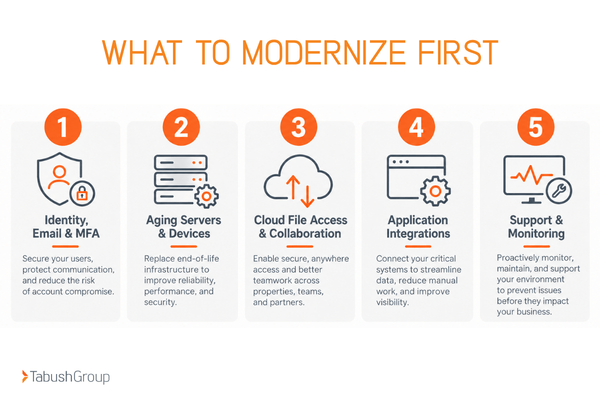
Identity, email, and MFA: These systems affect communication and access across the firm.
-
Aging servers, desktops, remote access, and backup: Older infrastructure may create support and reliability issues.
-
Cloud file access and collaboration: Mobile teams need dependable access to documents across locations.
-
Application integrations: Review supported versions and connections involving MLS-adjacent systems, CRM platforms, accounting software, document tools, and other vendor applications.
-
Support and monitoring: The modernized environment needs ongoing maintenance, visibility, and a clear support path.
Managed IT services can help coordinate these areas as part of the firm’s broader technology environment. Security should also be addressed across identity, endpoints, email, data, and user access as part of that plan.
Where A Managed IT Partner Fits
A managed IT partner for real estate firms can coordinate assessment, migration, security, vendor dependencies, testing, and ongoing support around the firm’s operating calendar.
For firms considering cloud desktops, solutions such as Boxtop can help provide familiar access to applications and files from a cloud-based environment.
For firms that need a baseline and roadmap before planning larger IT changes, a 360 IT Assessment can provide a practical starting point.
Plan Modernization Around the Work That Cannot Stop
Real estate IT modernization should protect transaction continuity, user access, and security throughout the project.
Start by mapping workflows and dependencies. Identify important closing dates before setting the project schedule. Pilot changes with a representative group, test actual transaction tasks, establish a rollback and escalation plan, and continue monitoring after launch.
This approach gives the firm a structured way to improve its technology while keeping active deals at the center of the plan.
Learn how Tabush Group provides IT services for real estate firms, or start by reviewing your current environment with a 360 IT Assessment.
FAQs
How can a real estate firm modernize IT without disrupting closings?
Use a phased plan: map closing-critical workflows, inventory application dependencies, pilot with a small group, test real transaction tasks, schedule cutovers around the closing calendar, and keep a rollback and support escalation plan ready.
What technology should a real estate firm upgrade first?
Start with systems that create the highest operational or security risk, usually identity and email security, aging servers and devices, remote access, backups, cloud file access, and unsupported business applications.
How should a real estate firm plan an IT migration around active deals?
Mark critical closings and transaction deadlines before setting the migration schedule. Avoid major changes immediately before those dates, test access to transaction systems in advance, and assign a same-day escalation path for closing-related issues.
Can a real estate firm move to the cloud without changing how employees work?
Often, yes. A well-planned cloud or Desktop as a Service migration can preserve familiar applications, files, and workflows while changing the infrastructure behind them. Compatibility and user acceptance testing should be completed before broad rollout.