A construction company should upgrade its IT when technology becomes a recurring operational, security, growth, or insurability risk.
One isolated issue may need just a small fix. But when repeated problems show up across teams, sites, or systems, this calls for a broader assessment and plan.
This guide will walk you through the four triggers that push construction leadership to act, including aging hardware nearing end of life, growth that has outpaced your network and access setup, cyber insurance renewal friction, and the need to modernize estimating and project software.
It also covers how to evaluate a fix versus an upgrade versus a full replacement, and how to plan the work without disrupting active projects. For a broader look at where technology tends to fall behind, see our overview of technology challenges facing construction companies.
If you're already feeling friction from outdated systems, managed IT services for construction companies can help you get ahead of it before it becomes a bigger problem.
The Quick Answer: Upgrade When IT Becomes An Operational Risk
Here’s the quick answer: fix isolated issues, optimize supported systems with limited gaps, and plan an upgrade when recurring problems affect multiple workflows or business requirements.
Most construction companies land in one of four trigger categories: lifecycle, growth, security/insurance, and software modernization. The signs below point to each of these.
7 Signs It Is Time To Upgrade Your Construction Company's IT
Here are a few signs your IT is doing more harm than good.
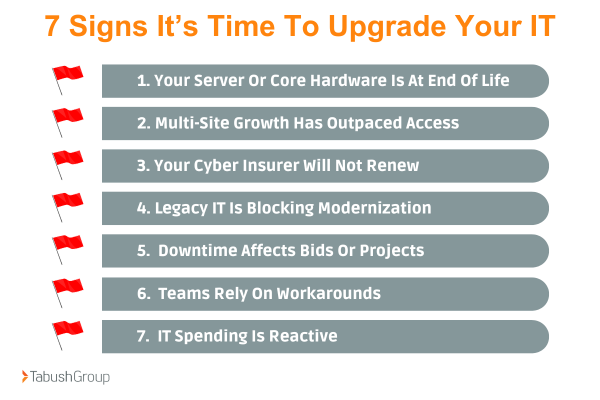
1. Your Server Or Core Hardware Is At End Of Life
Expired warranties, unsupported operating systems, recurring capacity problems, unreliable restores, and applications that cannot be upgraded are all signs your server or hardware needs a hard look.
If an application depends on hardware or software that can no longer be upgraded, that dependency puts everything built on top of it at risk. For a construction company, that can impact estimating files, project accounting records, shared drawings, payroll, and bid deadlines.
2. Multi-Site Growth Has Outpaced Access And Connectivity
Adding offices, expanding jobsites, or acquiring another company can change what you need from your network. A setup that worked fine for one office and a handful of field users often starts to strain under multiple locations, remote estimators, and jobsite trailers.
This causes:
-
Slow VPN
-
File-sync problems between sites
-
Personal hotspot workarounds
-
Inconsistent security practices per location
-
Support delays
Growth like this changes your entire network architecture and stalls projects.
3. Your Cyber Insurer Will Not Renew or Adds New Conditions
Insurers are expecting more than they used to. Multi-factor authentication (MFA), endpoint detection, backups, patching, logging, incident response, awareness training, and documentation are now required.
But sometimes a renewal problem comes down to a lack of evidence or documentation of cybersecurity measures, not missing controls. If you’re not sure, an assessment tells you which one you are dealing with and whether there are gaps in your IT.
4. Legacy IT Is Blocking Modernization
If your team wants to move forward with tools like Procore, Bluebeam Revu, Autodesk Construction Cloud, Sage 300 CRE, or updated estimating tools, your underlying infrastructure must be able to support them.
When you have older IT infrastructure, it can get in the way of adapting new tools.
-
Old workstations and servers lag
-
There’s not enough storage
-
Integrations can’t connect
-
Permissions have to be rebuilt
-
Training becomes outdated
5. Downtime And Repeat Support Problems Affect Bids Or Projects
There is a difference between a one-off ticket and a recurring pattern. Your system may no longer be keeping pace with your business if you are experiencing these regularly:
-
Estimators are waiting on files
-
Project managers are missing current drawings
-
Payroll is delayed
-
Closeouts are stalled
-
Field teams are unable to reach systems
6. Teams Rely On Workarounds And Multiple Versions Of The Truth
Are you noticing the following:
-
Personal cloud folders
-
Emailed drawings from personal devices
-
Shadow spreadsheets
-
Local copies saved to desktops
-
Texted photos of sensitive information
-
Shared logins amongst employees
While these workarounds go against security best practices, do not blame your employees. These workarounds show that the approved system no longer supports the workflow.
7. IT Spending Is Reactive, And Leadership Has No Roadmap
Watch for surprise hardware purchases, emergency license renewals, repeated break-fix invoices, unclear asset ownership, and no 12- to 24-month lifecycle plan.
Reactive spending tends to cost more over time than a planned approach, and it makes budgeting, insurance renewals, and project continuity harder to manage with confidence.
Optimize, Upgrade, Or Replace? Use This Decision Framework
|
Decision |
Use when |
Next step |
|---|---|---|
|
Optimize |
The platform is supported, the issue is isolated, capacity is sufficient, and risk is low. |
Configuration, cleanup, training, policy, or a targeted hardware/network fix. |
|
Upgrade in phases |
The environment is supportable but has measurable security, performance, integration, or scalability gaps. |
Prioritized roadmap, pilot group, budget, sequence, and measurable outcomes. |
|
Replace/migrate |
Systems are unsupported, repeatedly fail, block required software, cannot meet insurer/client requirements, or lack reliable recovery. |
Business-case-led replacement or cloud migration with tested cutover and rollback. |
How To Upgrade Your IT Without Disrupting Active Projects
Here is a step-by-step guide to upgrading your IT without disrupting your company.
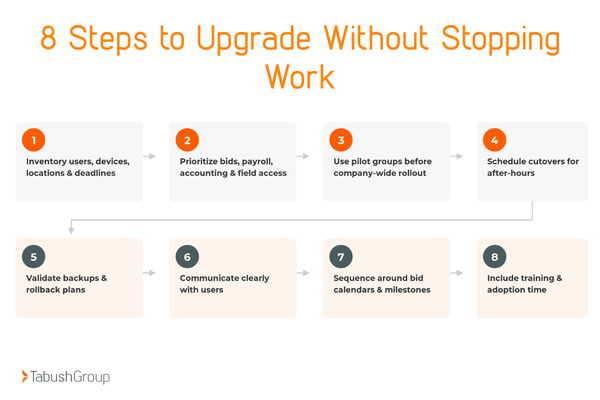
Step 1: Inventory Assets
Inventory users, devices, locations, applications, data, integrations, licenses, and business-critical deadlines. This becomes the reference point every other decision is measured against.
Step 2: Prioritize
Prioritize systems tied to bids, payroll, project accounting, drawings, closeout, and field access. These carry the most risk if something goes wrong mid-transition, so they get evaluated first.
Step 3: Run A Pilot
Use pilot groups before rolling out any company-wide changes. A small group surfaces problems while they are still easy to fix.
Step 4: Schedule Smart
Schedule cutovers for after-hours. This keeps active bids, project work, and field access from being interrupted mid-day.
Step 5: Backup & Test
Validate backups, run restore tests, and establish a rollback plan. A backup only proves its value once it has been tested with an actual restore. Make testing part of a recurring schedule, and test again after any major system change so backups remain verified.
Step 6: Communicate Clearly
Establish clear communication with users throughout the entire process. People should know what is changing, when, and what to do if something looks off, before it happens rather than after.
Step 7: Plan Around Business
Sequence work around bid calendars, major project milestones, month-end, and payroll. Instead of basing the upgrade on what is convenient for IT, plan the upgrade around the business.
Step 8: Train
Include training and adoption time in planning. A new system does not deliver value until estimators, PMs, and field teams actually know how to use it.
The cutover is not complete until estimators, PMs, and field teams can use the new workflow.
What A Construction-Focused IT Assessment Should Deliver
An IT assessment is a chance to review your current IT infrastructure to identify gaps and areas for improvement.
An IT Assessment should include:
-
Executive Summary - Key concerns, immediate action items, and strategic recommendations to guide your IT improvements
-
Overview of Assets - Detailed inventory of all IT assets to understand your current technology infrastructure
-
Risk Assessment and Analysis - Evaluation of vulnerabilities and mitigation strategies to reduce risks
-
Cybersecurity Score - Insight into your cybersecurity to identify areas for strengthening
-
Benchmarking Data - Comparative insights based on industry standards for informed decision-making
-
SWOT Analysis - Assessment of strengths, weaknesses, opportunities, and threats to optimize your IT strategy
-
End-User Feedback - Insights from stakeholders (leadership, finance, operations, estimating, project management, field users, and IT) on IT performance and usability to identify improvements
Beyond the report, expect follow-up meetings and expert guidance to answer your IT questions.
Tabush Group’s 360 IT Assessment is a structured fact-finding process, not a prewritten replacement pitch.
Make A Strategic IT Upgrade
An IT upgrade should be triggered by recurring business risk, not by age alone. Waiting to act until an outage, renewal deadline, or software migration tends to be more disruptive and more expensive than planning for these events in advance.
If you are seeing any of the signs, a 360 IT Assessment is the smart starting point before making any IT decisions. If your team needs ongoing IT support, see what our managed IT services for construction companies look like.
FAQs
How often should a construction company assess its IT?
Construction companies should assess their IT every 1 to 3 years, and sooner after rapid growth, an acquisition, repeated outages, an insurance issue, or a major software change. Avoid a universal rule. Tie timing to your business and how much your technology has changed.
Can a construction IT upgrade be completed in phases?
Yes, a construction IT upgrade can be completed in phases. Prioritize the highest-risk systems and business-critical workflows, use pilots, schedule cutovers around project deadlines, and maintain tested rollback and recovery plans.
Does a construction company need to move everything to the cloud?
No, construction companies do not need to move everything to the cloud. The right model depends on applications, connectivity, security, cost, performance, and recovery requirements. The assessment should determine what stays, what moves, and in what order.
What should happen before upgrading estimating or project software?
Before upgrading estimating or project software, review infrastructure, workstation requirements, storage, integrations, permissions, data quality, migration, training, and timing. New software can shift the bottleneck if the underlying environment is not ready.
Should a construction company complete an IT assessment before upgrading?
Yes, construction companies should complete an IT assessment before upgrading. An assessment identifies outdated equipment, security gaps, software requirements, and infrastructure limitations before the company invests in new technology.
Can outdated IT affect cyber insurance renewal?
Yes, outdated IT can affect cyber insurance renewal. Unsupported systems, weak security controls, and untested backups may lead to higher premiums, additional requirements, or denial of renewals.