
Multi-site security for construction means applying consistent IT, device, identity, and network controls across headquarters, jobsite trailers, field workers, and temporary project locations.
Managing IT security becomes more complex when construction companies oversee multiple active projects, each with different connectivity, equipment, and access requirements.
Project managers and superintendents regularly move between jobsites, relying on tablets, phones, and cloud platforms to access project information. Temporary trailers and subcontractors introduce additional connectivity and access requirements as projects begin and end.
Without a standardized approach, each new project can introduce different network configurations, access permissions, and support processes. Establishing a repeatable IT framework helps construction companies manage these moving parts as projects begin, expand, and close.
Here are six essential controls construction companies can use to strengthen jobsite cybersecurity, protect project information, and keep field and office operations connected.
Tabush Group's managed IT services for construction help companies manage connectivity, remote access, and technology support across their offices and active jobsites.
Key Takeaways
-
Standardized IT controls simplify multi-site management: Applying the same security policies across jobsites helps construction companies manage growing technology demands.
-
Secure networks keep field teams connected: Segmented Wi-Fi, secure remote access, and reliable connectivity help protect business systems while supporting daily operations.
-
Field devices need centralized management: Encryption, software updates, access controls, and mobile device management (MDM) help secure laptops, tablets, and phones across multiple locations.
-
Access to project data should be controlled: Multi-factor authentication, role-based permissions, and approved cloud platforms help employees and subcontractors securely access the information they need.
Why Multiple Jobsites Create a Different IT Security Problem
A construction company with multiple active sites has one business environment spread across many temporary networks, devices, and users.
Picture this: a general contractor opens three new projects within a few weeks. Each location may need internet connectivity, laptops, field tablets, printers, and access to construction management software.
Project managers may split their time between those locations, while subcontractors need permission to view specific documents. Every new connection and device adds another element for the IT team to manage.
Some of the most common challenges include:
-
Temporary infrastructure: jobsite trailers and connectivity change as projects mobilize, progress, and close.
-
Mobile users: project managers and superintendents move between headquarters, jobsites, home offices, and client locations.
-
More endpoints: laptops, tablets, phones, printers, scanners, cameras/IoT, and shared devices may all touch the jobsite network
-
Short-term access: subcontractors, vendors, and temporary staff may need project-specific access for limited periods.
-
Project platforms: Procore, Autodesk Construction Cloud, Bluebeam, Microsoft 365, and accounting or ERP systems connect field and office workflows.
These moving parts make it important to establish consistent security policies that can be applied as employees, subcontractors, and equipment move between projects.
These challenges can become harder to manage as a company expands. Our guide to the technology challenges facing construction companies explores additional issues that can affect daily operations.
The 6 Controls That Make Multi-Site Construction IT Secure
A consistent multi-site construction IT strategy starts with six controls that can be standardized across active locations.
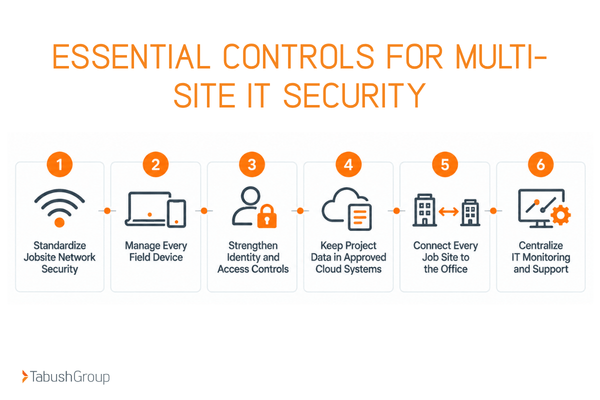
1. Standardize Jobsite Network Security
Every construction jobsite needs a reliable, properly configured network that allows authorized employees to access essential business applications.
Use:
-
Secure network equipment
-
Current firmware
-
Reliable primary connectivity
-
Cellular failover where needed
-
Secure connections to office and cloud systems
-
Separate company access from guests or subcontractors
-
Connected jobsite equipment where appropriate
When every jobsite follows an established network configuration, IT teams can troubleshoot issues and manage security settings without learning an entirely different setup at each location.
2. Put Every Field Device Under Central Management
Company laptops, tablets, and phones should have:
-
Encryption
-
Screen locks
-
Endpoint protection
-
Application management
-
Remote lock and wipe
When employees use personal devices for work, establish a separate bring-your-own-device (BYOD) policy covering authentication, approved applications, company data, and device security.
3. Use Identity as a Consistent Security Layer
Employees and subcontractors need appropriate access to construction applications regardless of which jobsite they are working from. Consistent identity and access controls help companies manage permissions across locations and projects.
Important controls include:
-
Multi-factor authentication (MFA): Require an additional step beyond a password for email, project platforms, remote access, and financial systems
-
Single sign-on (SSO): Allows users to access multiple supported applications through a centralized authentication process
-
Role-based permissions: Assign permissions based on an employee's responsibilities and project involvement
Establish a process to remove access when someone changes projects or leaves the company.
4. Keep Project Data in Controlled Cloud and Business Systems
Construction projects generate substantial documentation, including drawings, requests for information (RFIs), submittals, contracts, and financial records.
Teams working across multiple jobsites need reliable access to current project documents, with permissions that help protect sensitive information. Approved cloud and business platforms can support centralized document storage, controlled sharing, and collaboration between office and field employees.
A practical approach includes:
-
Storing documents in approved applications
-
Applying permissions based on roles
-
Using version controls
-
Establishing backup and recovery procedures
-
Maintaining audit logs
-
Limiting unnecessary downloads
Consider this common scenario: a superintendent reviews an updated drawing on a field tablet while the project manager accesses the same file from headquarters. When both employees work from an approved, centrally managed platform, they can reference the current version without relying on separate local copies.
5. Connect Jobsites to the Office Through One IT Operating Model
Construction companies benefit from a consistent process for accessing business applications, shared files, accounting systems, printers, and IT support across all locations.
Avoid different workarounds at every project. Standardize how field teams connect to Microsoft 365, Procore, Autodesk Construction Cloud, Bluebeam, and accounting or enterprise resource planning (ERP) software.
Secure remote access, including a virtual private network (VPN) where appropriate, can help protect connections to internal company resources.
This helps employees at jobsites access the systems they need in a reliable way, while IT maintains visibility and control over those connections.
6. Monitor and Support Every Site Centrally
Multi-site IT management allows construction companies to monitor devices, network equipment, updates, and security alerts across all active locations.
-
Centralize patching
-
Monitor devices and networks
-
Track security alerts and investigate unusual activity
-
Maintain inventory of devices and network equipment
-
Provide a clear support path
Document what is deployed at each site so IT can troubleshoot and decommission it cleanly at project close.
Centralized IT management also makes it easier to prepare for new construction projects. When a construction company opens another location, its IT team can use an established deployment process rather than developing a new setup from scratch.
How to Secure Jobsite Wi-Fi Without Slowing the Field Team
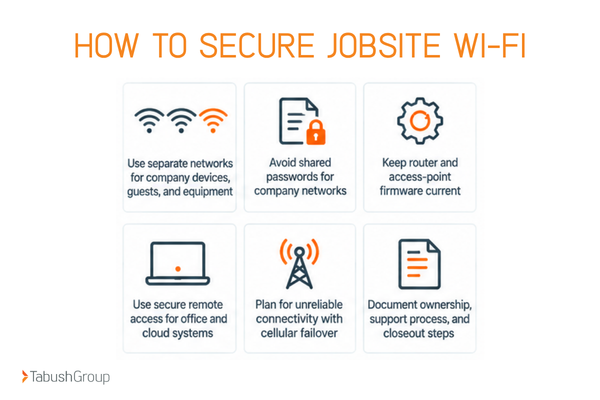
Jobsite Wi-Fi should provide reliable access for authorized crews while limiting the ability of compromised or unmanaged devices to access other business systems.
-
Use separate networks and SSIDs for company-managed devices, guests and subcontractors, and connected jobsite equipment where appropriate.
-
Avoid shared passwords posted in trailers for the network that reaches company systems.
-
Keep router and access-point firmware current and change default administrator credentials.
-
Use secure remote access for office and cloud systems, and avoid directly exposing internal resources to the public internet.
-
Plan for unreliable connectivity with cellular, LTE, or 5G failover where the project requires it.
-
Document who owns the jobsite network, how support is requested, and what happens when the project closes.
For employees accessing office resources remotely, review these secure remote access considerations.
Reliable connectivity helps employees access project information, but the devices they use also need to remain secure as they move between locations.
Field Device Management: Phones, Tablets, Laptops, and BYOD
A field device should follow the same security policy whether it is at headquarters, in a trailer, or in a superintendent’s truck.
Mobile device management (MDM) allows construction companies to centrally manage company-owned phones, tablets, and other supported devices across multiple jobsites. IT teams can apply security policies, deploy approved applications, and monitor device configurations without needing physical access to each device.
As employees move between projects, centralized management helps maintain consistent security settings and reduces the need for individual device configurations at each location.
What to Do When a Device Is Lost or Stolen
A documented lost-device response should give employees and IT teams clear next steps:
-
Report quickly
-
Revoke sessions and access
-
Remote lock or wipe the device when supported
-
Replace it without delaying the project
Company-Owned Devices vs. BYOD
When employees use personal phones or tablets for work, a BYOD policy should establish clear expectations for authentication, approved applications, and company data. It should also explain how business access will be managed when a device is lost, replaced, or no longer used for work.
The National Institute of Standards and Technology (NIST) provides additional guidance on securing employee-owned devices while addressing organizational data protection and employee privacy.
Keep Jobsite and Office Systems Connected Without Creating Separate IT Islands
A construction company's jobsite-to-office IT strategy should create a managed environment that supports secure remote access to business systems as projects begin, expand, and close.
Start of Project
The process begins before the first employee connects to a new jobsite network. Each time a new project starts, deploy from a repeatable checklist.
-
Use consistent identities and permissions across field and office applications
-
Keep approved project files and applications accessible from the field without copying data into unmanaged local folders
-
Standardize support, monitoring, patching, and escalation across every site
-
Confirm primary internet and backup connectivity requirements
-
Configure network equipment and separate Wi-Fi access where appropriate
-
Enroll company devices in management platforms
-
Document network configurations, equipment inventory, and support contacts
End of Project
When a construction project ends, teams should follow a consistent IT closeout process to:
-
Revoke temporary access
-
Recover company-owned hardware
-
Archive documentation
-
Remove network equipment
-
Update inventory records
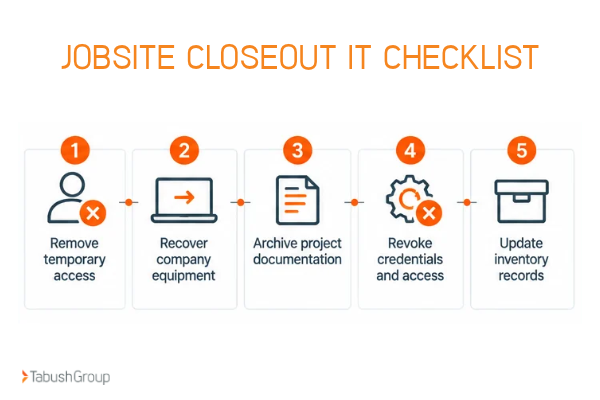
Following these steps helps IT teams remove unnecessary access, account for company equipment, and complete project closeout in an organized manner.
Build a Consistent IT Security Strategy Across Every Construction Jobsite
Construction multi-site security is a consistency problem. Networks, devices, identities, cloud access, and support should follow one standard across every project.
Tabush Group partners with construction companies to address technology challenges across their offices and jobsites, including connectivity, mobile workforce access, and centralized IT management.
Learn how Tabush Group's managed IT services for construction bring together connectivity, mobile workforce support, and cybersecurity capabilities to help construction companies manage technology across multiple locations.
FAQs
How do construction companies secure IT across multiple jobsites?
Use a standard security baseline at every location: business-grade network equipment, segmented Wi-Fi, managed field devices, MFA and role-based access, approved cloud platforms, and centralized monitoring and support. The controls should follow users and devices as projects change.
How should a construction company secure jobsite Wi-Fi?
Use business-grade network equipment, strong administrator credentials, current firmware, and separate access for company devices, guests or subcontractors, and connected equipment where appropriate. Use secure remote access for business systems and plan for cellular failover when connectivity is unreliable.
How can construction companies secure tablets and phones used in the field?
Enroll company devices in mobile device management, require encryption and screen locks, keep operating systems and apps patched, use endpoint protection where supported, and enable remote lock or wipe. BYOD should follow a separate policy that defines how company data is accessed and stored.
How do you connect construction jobsites to the main office securely?
Use consistent identity controls, approved cloud applications, secure remote access, managed devices, and centralized network and security monitoring. Keep project data in controlled systems so field teams can access current information without creating unmanaged copies at each site.